How Your Data Is Protected
Device-controlled encryption, per-user data isolation, sensitivity classification, and what happens when you delete your account.


Your research data contains ideas, strategies, and information you would not share with just anyone. LumaVista is built on a simple principle: your data belongs to you, and the system should be designed so that even we cannot access it without your active participation. This page explains exactly how that works — from the encryption keys on your device to what happens when you decide to leave.
Encryption overview
LumaVista uses a layered encryption architecture where your device — not our servers — controls the keys that protect your data. Every piece of research data you create is encrypted at rest using industry-standard AES-256-GCM encryption. But what makes this different from typical cloud encryption is who holds the keys.
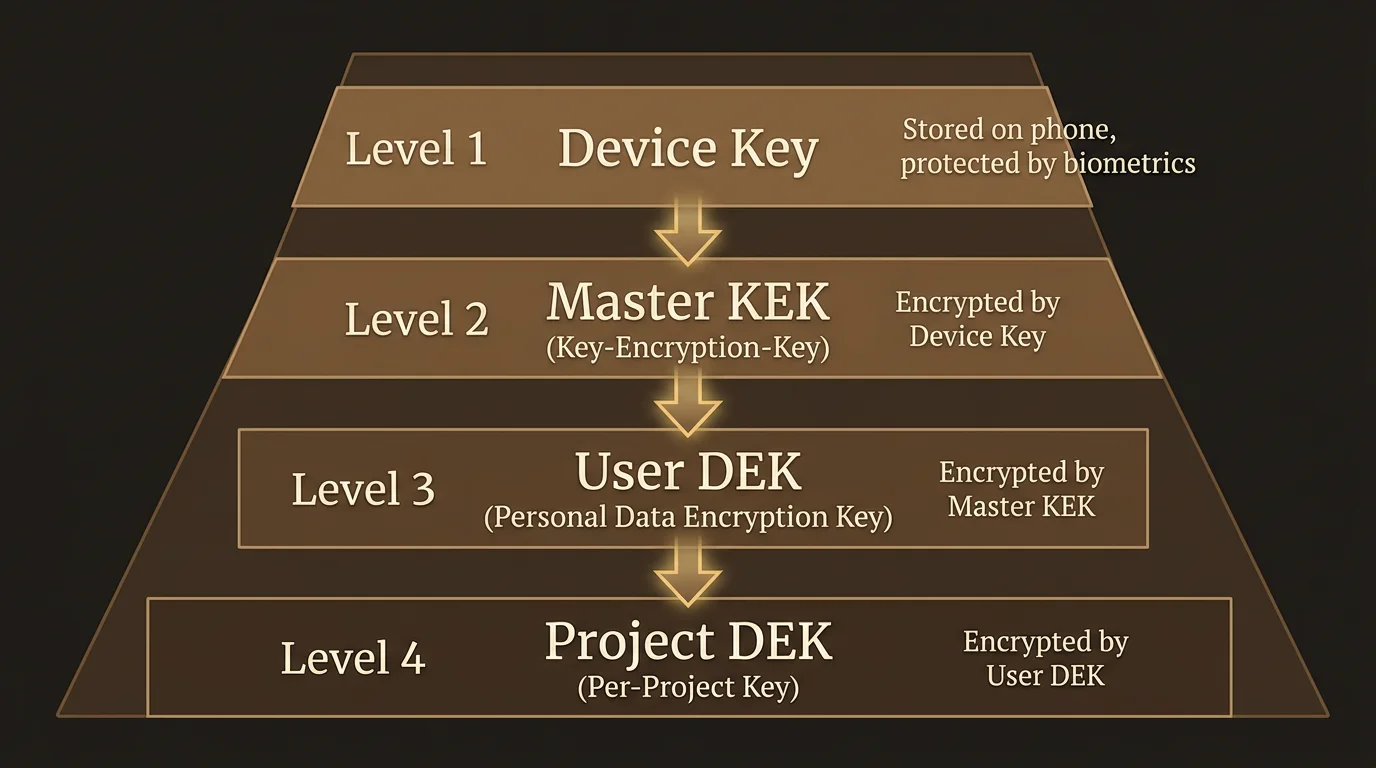
The key hierarchy
Your encryption is organized in four layers, each protecting the next:
Device Key — An X25519 asymmetric keypair generated in your browser, on the machine you are sitting at. The private half never leaves it: not to us, not over the connection. Each browser you enrol holds its own. (A forthcoming companion app will move this key into your phone’s dedicated security hardware, where even the operating system cannot extract it — see Setting Up Your Encryption.)
Master Key Encryption Key (Master KEK) — A 256-bit random key generated when you first set up encryption. This is the master key that protects everything else. It is never stored in the clear on our servers. Instead, it is encrypted (wrapped) to each of your enrolled devices using their Device Keys. Only a device you physically control can unwrap it.
User Data Encryption Key (User DEK) — An AES-256-GCM key that encrypts your personal databases: your settings, preferences, chat history, and memory (the entities and relationships LumaVista learns about your research interests over time). The User DEK is itself protected by the Master KEK.
Project Data Encryption Keys (Project DEKs) — Each research project gets its own AES-256-GCM key. This means individual projects can be managed independently — a foundation for future features like selective sharing, where you could give a collaborator access to one project without exposing everything else. Project DEKs are also protected by the Master KEK.
How a session works
When you open LumaVista and connect:
- Your browser or app establishes a secure WebSocket connection and authenticates.
- The server sends your device’s encrypted copy of the Master KEK.
- Your device decrypts the Master KEK using its Device Key.
- The decrypted Master KEK is sent over the encrypted connection to the server.
- The server uses it to unlock your User DEK and open your encrypted databases.
- Your research data is available for the duration of your session.
When you disconnect — or if the server restarts — all key material is wiped from server memory. Your data on disk returns to being opaque ciphertext that nobody can read without your device.
Why this design
Most cloud services hold your encryption keys for you. That means they can decrypt your data whenever they choose — or whenever someone compels them to. With LumaVista’s device-controlled encryption, unlocking your data requires a device you physically possess. If you are not connected, your data is unreadable. Full stop.
Per-user data isolation
Beyond encryption, LumaVista enforces a strict physical separation of user data. Every user gets their own set of databases, stored in their own directory on disk.
Your data lives at data/<your-user-id>/ and consists of:
- settings.db — Your preferences, chat sessions, project index, and model configuration. Small, read-heavy.
- memory.db — The entities, topics, and relationships that LumaVista learns from your research. Can grow larger over time, write-heavy.
- projects/<project-id>/project.db — One database per project, containing your research graph, budget tracking, and runtime state.
This is not just a logical separation with different database tables sharing the same storage. These are physically separate databases in separate directories. There is no shared database that mixes your data with another user’s data.
What lives where
LumaVista uses several stores, each with a clear boundary:
| Storage | Contains | Your content? |
|---|---|---|
Your Badger databases (data/<userID>/) | Research, memories, settings, projects | Yes — encrypted, fully yours |
| Object storage, under your own prefix | Uploaded files, recordings, generated media | Yes — encrypted, fully yours |
| PostgreSQL | Authentication, profiles, subscriptions, device registry, wrapped key blobs | Identity only — no research content |
| A shared vector store | Text of public web pages the crawler fetched, keyed by content hash | No — never your content |
| Redis | Session tokens, rate limits, real-time messaging | Never — ephemeral runtime state only |
The security invariant is straightforward: no content you create or upload ever touches PostgreSQL or Redis. Your research, your memories, your chat history, your documents — all of it stays in your own encrypted store.
The fourth row deserves an explanation rather than a footnote, because a shared store sounds like an exception. It is not. When LumaVista’s crawler fetches a public web page, the text of that page is cached in a shared index so that two users researching the same topic do not each pay to re-crawl and re-embed the same public article. It contains public pages and nothing else — your uploaded documents are never indexed there. They are chunked and embedded into your own per-user store, and retrieval against them is scoped to you. Which of those cached public pages are visible to a given project is itself controlled by references held in that project’s own storage, so one project cannot read another’s retrieval scope.
Database lifecycle
Your databases are not sitting open all the time. They follow a just-in-time lifecycle:
- Opened when you connect via an authenticated WebSocket session (your device provides the decryption key).
- Shared across multiple browser tabs from the same session (no duplicate key material in memory).
- Closed when your last connection disconnects. Key material is zeroed from memory.
- Project databases are opened on demand when you start a project and closed when it stops.
If the server restarts, all databases close and all keys are wiped. Your next connection re-authenticates and re-provides the key.
Automatic sensitivity classification
Not all data carries the same risk. An email address in a research note is less sensitive than a credit card number that accidentally ended up in a document you uploaded. LumaVista includes a built-in classification engine that automatically scans content and tags it by sensitivity level.
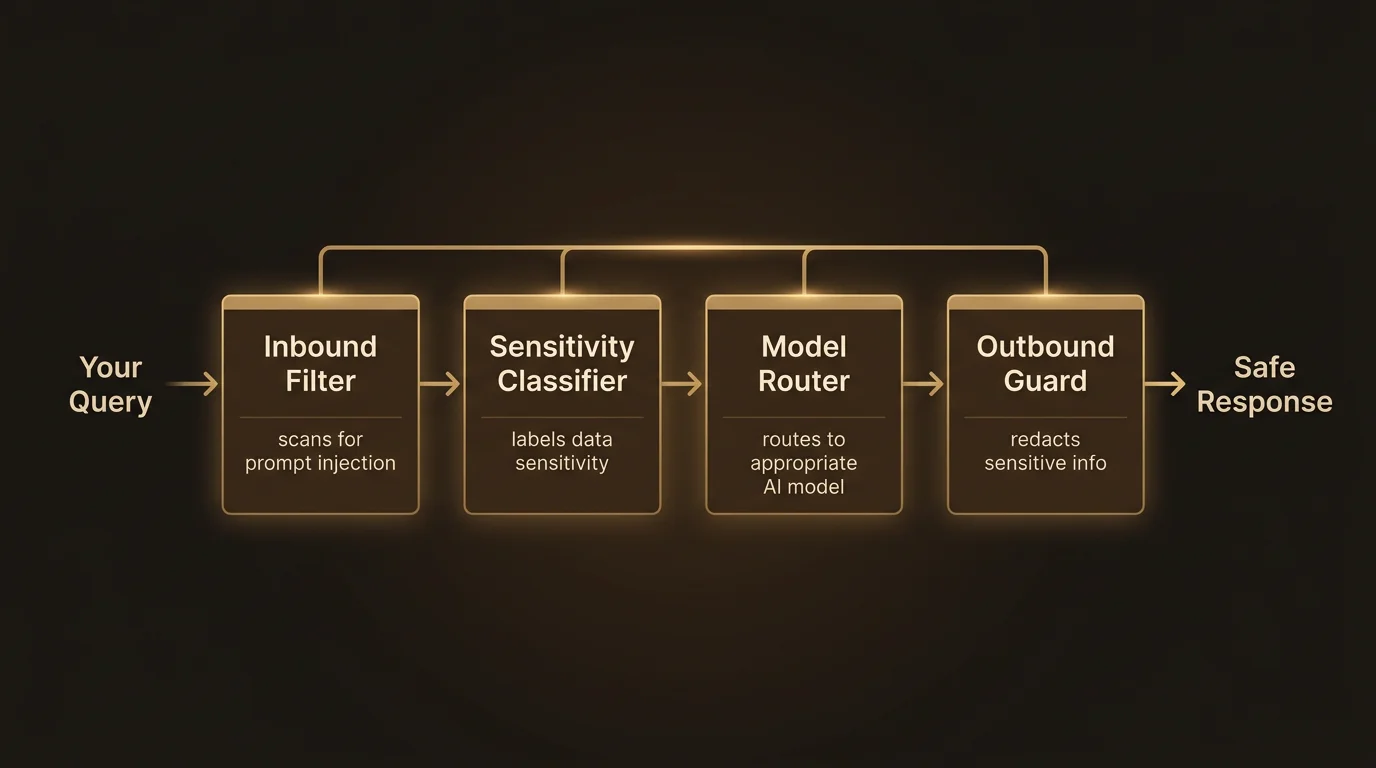
What gets classified
The classifier scans all content flowing through the system — your research inputs, search results, uploaded documents, AI responses — and identifies:
Personally identifiable information (PII): Credit card numbers (validated with Luhn checksums), bank account numbers, national identity numbers for EU member states (Dutch BSN, Spanish DNI, French INSEE, German Personalausweis, and others — each with country-specific validation), IBAN numbers, email addresses, phone numbers, passport numbers, dates of birth, and health-related data.
Secrets and credentials: API keys (AWS, GitHub, GitLab, Stripe, Slack, Azure, and generic patterns), JWT tokens, private keys, database connection strings, and passwords.
Threat indicators: Prompt injection attempts (both direct instruction hijacking and indirect techniques like zero-width character smuggling), malicious URL patterns, emotional manipulation language, and content designed to cause processing issues (XML entity expansion attacks, deeply nested JSON, oversized payloads).
How classification drives protection
Each detected item is assigned a clearance level according to how sensitive it is — a public web quotation and a private key are not the same problem. Clearance drives two things: how aggressively the item is redacted before a request goes out, and whether its presence should raise the trust floor for that request beyond what you set as your baseline.
Both of those — where processing is allowed to happen, and what gets stripped before anything leaves — are covered in Where Your Data Is Processed.
Enterprise custom rules
Organizations can define their own classification patterns. If your company has internal project codes, proprietary terminology, or industry-specific identifiers that should be treated as sensitive, you can add custom regex-based rules with your chosen clearance level. Custom rules go through a safety check to prevent catastrophic backtracking (a class of regex vulnerability), and they are scoped to your organization.
What happens when you delete your account
You can delete your account yourself, from Settings → Privacy & data. It asks for your password and for you to type the word DELETE, because there is no undo and no grace period — deletion is immediate and total.
What runs when you confirm is an orchestrated sequence, and the order is the point. Erasure done in the wrong order leaves fragments behind, so each step is positioned to close a door before the next one needs it shut:
- Background work stops first. Every scheduled trigger you own is deregistered, in-flight runs are cancelled, and the snapshotting that keeps your data available across servers is suppressed — so nothing writes your data back while it is being removed.
- Your sessions are killed and your enrolment tokens cleared. These are actively deleted, not left to expire.
- Your keys are destroyed. This happens before the bulk deletion, deliberately: the moment the wrapped key material is gone, everything still on disk is unreadable ciphertext, so an interruption mid-way cannot leave readable data behind.
- Your stored objects are purged — the whole prefix, including uploads, recordings and generated media.
- Your databases are removed — the entire per-user directory.
- Your identity records are deleted from PostgreSQL last, cascading through devices, credentials and sessions.
The whole sequence runs detached from your browser, so closing the tab or losing your connection cannot abandon a half-finished erasure.
Your device also deletes its local encryption key, so the browser you deleted from retains nothing.
What is kept, and why
Total erasure of your data is not the same as erasing every row that mentions you, and it would be dishonest to imply otherwise. Two categories are retained in anonymised form:
- Billing records. Financial records carry statutory retention obligations we cannot waive. Your rows are severed from your organisation and scrubbed of identifying detail, but the transaction record itself survives.
- The consent record and audit entries. Records of what was consented to, and of administrative actions, are retained with your identity removed — an audit trail that could be erased by its subject would not be an audit trail.
Everything else — research, reports, notes, documents, recordings, knowledge graph, chat history, settings — is gone.
Why this is recoverable by nobody
Because your data was encrypted under keys your devices controlled, and because that key material is destroyed before the data is, there is no path back even from a backup. A backup of the ciphertext is not a backup of your data; without the keys it is noise. We cannot restore your account as a favour, and we cannot be compelled to.
No user data in central databases
It is worth stating this explicitly because it is a deliberate architectural choice: LumaVista maintains no central database containing user research data. There is no master index of your research topics. No aggregated analytics table built from your queries. No shared store holding content you created, where a bug or breach could expose multiple users’ work at once.
The one shared store that exists holds cached text of public web pages, as described above. It contains nothing you wrote, uploaded, or recorded.
PostgreSQL stores what it needs to for authentication and billing — your email, your hashed password, your subscription status. Redis handles ephemeral runtime coordination — session tokens, rate limits, real-time event channels. Neither contains anything you would recognize as “your data.”
This means a breach of the central PostgreSQL database would expose account metadata (email addresses, subscription tiers) but not a single research query, memory entity, or project result. A breach of Redis would expose session tokens (which are short-lived and can be invalidated) but no persistent user content.
How this connects
LumaVista’s data protection is not a single feature — it is a set of reinforcing layers:
- Encryption ensures data at rest is unreadable without your device.
- Isolation ensures your data is physically separated from every other user’s data.
- Classification ensures sensitive content is identified and handled appropriately.
- Sovereign processing and redaction mean every model running your research is EU-sovereign, and sensitive spans are stripped before a request leaves — see Where Your Data Is Processed.
- Device-held keys make all of it enforceable rather than promised — see Setting Up Your Encryption for devices, rotation and recovery.
Together, these layers mean that protecting your data is not something you have to think about or configure. It happens automatically, by design, every time you use LumaVista.
For a high-level overview of LumaVista’s security commitments, visit the Security page. For implementation details on the encryption, isolation, and classification systems described above, see the Security Architecture whitepaper.